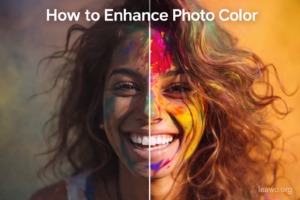
In today’s visual-first world, vibrant and accurate colors can make or break a photo. Whether you’re editing travel shots, portraits, product photos, or restoring old memories, knowing how to enhance photo color properly is essential. The good news? You don’t have to be a professional photographer to achieve stunning results.
With modern AI tools and classic manual techniques, anyone can improve dull, flat, or faded images. This guide will walk you through both beginner-friendly AI solutions and advanced manual methods so you can choose what works best for your needs.
1. One-Click AI Tools to Enhance Photo Color (Fast & Beginner-Friendly)
Artificial Intelligence has transformed photo editing. Instead of manually adjusting multiple sliders, AI tools analyze your image and automatically apply color corrections, balance tones, and enhance contrast.
If you’re wondering how to enhance a photo quickly without technical knowledge, AI tools are the easiest starting point.
1.1 Desktop AI Photo Editor Software
Desktop software provides more power and higher-quality processing compared to browser-based tools.
One popular option is Leawo Photo Enhancer, a powerful AI-driven desktop solution designed for automatic image improvement.
Why Use Leawo Photo Enhancer?
- AI-powered color correction
- Automatic exposure balancing
- Noise reduction
- Face enhancement
- Batch processing
Unlike a basic photo color editor, this tool uses deep learning algorithms to analyze lighting, tone distribution, and image quality before enhancing.
How It Works:
- Install Leawo Photo Enhancer on your PC.
- Import your photo.
- Choose AI enhancement mode.
- Let the system automatically enhance photo color and details.
- Export in your preferred format.
This type of AI photo editor is ideal for photographers, content creators, and businesses that need fast but professional results.
1.2 Online Photo Color Enhancers
If you don’t want to install software, online platforms provide quick solutions.
Two popular examples include:
- Fotor
- Pixlr
These tools allow you to upload an image and apply one-click enhancements.
Features Typically Include:
- Auto color correction
- Brightness & contrast sliders
- Saturation & vibrance adjustments
- AI filters
How to Use:
- Upload your image.
- Select “Auto Enhance” or AI mode.
- Fine-tune sliders if needed.
- Download the final image.
Online AI tools are convenient but may limit resolution in free versions.
1.3 Mobile Apps for Quick Color Boost
Mobile apps are perfect for social media users and casual photographers.
Popular options include:
- VSCO
- Snapseed
Why Use Mobile Apps?
- Instant editing on the go
- Preset filters
- Easy color tuning
- Social media optimization
Many of these apps function as both a photo color editor and an ai photo colorizer, helping you revive faded tones or improve lighting in seconds.
2. Manual Methods to Enhance Photo Color
While AI is convenient, manual editing gives you greater control. Professionals often prefer manual methods for precision and creative flexibility.
If you truly want to master how to enhance a photo, understanding these techniques is essential.
2.1 Adjust White Balance for Accurate Colors
White balance corrects color temperature. Poor lighting can make photos look too blue (cool) or too orange (warm).
Steps:
- Locate Temperature and Tint sliders.
- Adjust temperature to remove unnatural blue/orange casts.
- Adjust tint to correct green/magenta shifts.
Correct white balance is the foundation of color enhancement. Without it, further adjustments may look artificial.
2.2 Increase Vibrance Instead of Saturation
Many beginners make the mistake of increasing saturation too much.
Difference Between Vibrance & Saturation:
- Saturation increases intensity of all colors equally.
- Vibrance boosts muted colors while protecting skin tones.
For natural results:
- Increase vibrance first.
- Add slight saturation only if needed.
This method prevents oversaturated skin and unrealistic colors.
2.3 Use Curves for Professional Color Boost
Curves are one of the most powerful editing tools.
How Curves Work:
The curve graph adjusts brightness and contrast in highlights, midtones, and shadows independently.
Basic Technique:
- Create a slight “S-curve”:
- Lift highlights slightly.
- Lower shadows slightly.
- Switch to individual RGB channels.
- Adjust red, green, or blue channels to refine tones.
Curves allow subtle color grading that AI tools often oversimplify.
3. Best Settings for Different Photo Types
Color enhancement should vary depending on the type of photo.
3.1 Portrait Photos
Goal: Natural skin tones and soft contrast.
Recommended Adjustments:
- Correct white balance first.
- Increase vibrance slightly.
- Avoid heavy saturation.
- Reduce highlights for softer skin.
- Use warm temperature for flattering tones.
Over-editing portraits can make skin look artificial, so subtlety is key.
3.2 Landscape Photos
Goal: Vibrant skies, rich greens, strong contrast.
Recommended Adjustments:
- Increase vibrance moderately.
- Enhance blues and greens selectively.
- Use curves for dramatic contrast.
- Add slight clarity or texture.
Landscapes can handle stronger color intensity than portraits.
3.3 Old & Faded Photos
Goal: Restore life to dull or damaged images.
This is where an ai photo colorizer truly shines.
AI tools analyze faded images and automatically restore missing tones. Desktop tools like Leawo Photo Enhancer are especially effective here.
Manual Method:
- Increase contrast slightly.
- Adjust levels to expand dynamic range.
- Use selective color correction.
- Remove noise before boosting color.
Combining AI and manual tweaks often delivers the best results for restoration.
4. AI vs Manual Editing: Which Should You Choose?
Both approaches have advantages.
AI Editing Pros:
- Fast and effortless
- Beginner-friendly
- Automatic optimization
- Great for batch processing
AI Editing Cons:
- Less creative control
- May over-enhance
- Not always consistent
Manual Editing Pros:
- Full precision control
- Professional-level results
- Customizable style
Manual Editing Cons:
- Requires learning curve
- Time-consuming
Best Approach?
Use AI as a starting point, then refine manually.
For example:
- Apply enhancement in an AI photo editor.
- Adjust vibrance and curves manually.
- Fine-tune white balance.
This hybrid workflow saves time while maintaining quality.
5. Conclusion
Learning how to enhance photo color can dramatically improve your images, whether for personal memories, social media, or professional use.
If you’re a beginner, start with:
- Desktop tools like Leawo Photo Enhancer
- Online platforms like Fotor or Pixlr
- Mobile apps such as VSCO and Snapseed
If you want full creative control, master manual techniques like:
- White balance correction
- Vibrance adjustment
- Curves manipulation
AI tools provide speed and convenience, while manual editing offers artistic precision. The best results often come from combining both methods.
With the right tools and techniques, even a flat, dull image can become vibrant, balanced, and visually stunning. Whether you use a powerful AI photo colorizer or prefer hands-on editing, enhancing photo color is now easier and more accessible than ever.